
Hello fellow translators,
Precisely at this month Translator++ has been around for a year.
For each passing day, Translator++ is getting closer to the game translation tool in my vision.
And this is all thanks to your support.
Translator++ wouldn’t exist without you!
In this happy moment I also want to announce the new release of Translator++
In this update I focus a lot on user experience when doing manual translation and editing, such as :
Half-width characters will exactly take half the space of full-width characters.
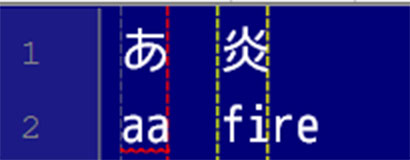
Font width comparison between full-width (ie. Kanji, hiragana, Chinese Hanzi) and half-width (alphanumeric) characters.
This change is mandatory for the following feature:
This is a nice addition to provide visual aid so the translator can know that the translation results will overflow in the in-game dialog box or not.

You can add and customize one or more markers.
Now you can resize the font on the Original Text’s window.

I changed the order of Japanese text rendering and related romaji. In the latest version, we can now select romaji characters or Japanese characters per line correctly. This cannot be done in the previous version.
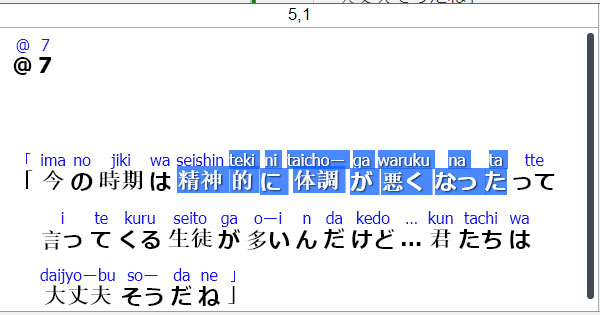
In the previous version, you can not select only the Japanese letter.
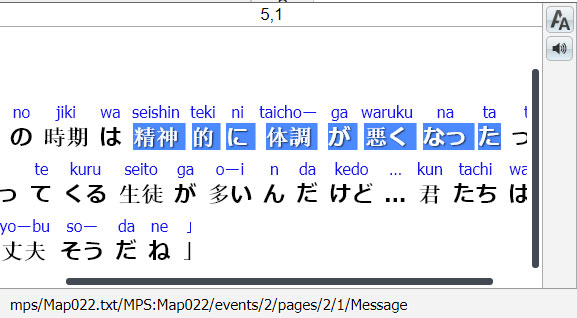
The behavior of selection has been corrected in the Ver. 1.11.19
Did you notice the audio button at the Original Text’s window’s toolbar?
I find it easier to understand spoken Japanese than written. So I always wanted to have a feature to help me read the text in the Original Text window out loud. If you’re like me, you will be greatly helped by this Text to Speech feature.
Maybe this feature doesn’t support all languages. And it might also required to install the destination language pack on Windows in order to use certain languages. Please check it out!
You can download Translator++ Ver. 1.11.19 at the patron’s download section.
Translator++ Ver. 1.11.6 is available for everyone.
Happy Translating!
matth
2019-12-25 13:19:49 +0000 UTCamhz007
2019-11-26 01:47:59 +0000 UTCDreamsavior
2019-11-23 10:28:45 +0000 UTCDreamsavior
2019-11-23 00:32:07 +0000 UTCautonomous spaghetti
2019-11-22 09:55:38 +0000 UTCautonomous spaghetti
2019-11-22 09:55:16 +0000 UTCautonomous spaghetti
2019-11-22 09:48:37 +0000 UTCDreamsavior
2019-11-19 11:08:57 +0000 UTCautonomous spaghetti
2019-11-19 06:39:26 +0000 UTC