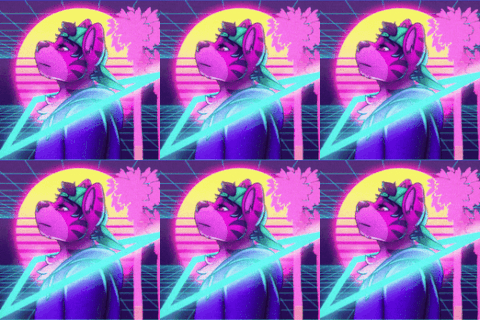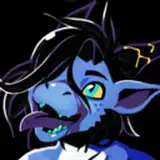
Introducing the Protonoid! A Protogen-inspired base for VRChat.
Equipped with an exosuit crafted for interplanetary exploration, these bio-engineered critters endlessly explore the unknown.
NOT QUEST COMPATIBLE
PSD FILE NOT INCLUDED
HSV SLIDERS INCLUDED, SUBSTANCE FILES INCLUDED.
Protonoid Guide (Free!)Test Avatar (Face Tracking)Test Avatar! (HSV)Support for other platforms is not guaranteed.
Blender is required for some of the customization features, and Poiyomi is required for the avatar to function properly. Download here:
BlenderPoiyomi Toon ShaderPerformance rating: Medium
9 Material slots : Body, Head, Hair, Armor, Infinity Mirror, Transparent, Trail, Gyroform Core, HUD (Local only).
Phys Bone Components: ~12
Skinned meshes: 2 (Armor, Body)
Texture memory usage: ~60MB
*Substance painter version used is 6.2.2. Prior versions will not be able to open the project.
Blender version used is 4.0.2, older versions might not be able to open the file.
Unity version currently required is 2022.3.6f1. Prior versions might not function properly, particularly with constraints.
Poiyomi version used is 8.1.167. earlier or later versions might cause multiple issues.
Terms of service:
Things you CAN do:
Things you CANNOT do:
These terms and description are subject to change at any time without notice.
Special Thanks:
Polygon Cherub for letting me use parts of their CherubBot shader for the HUD
Neo/Tokyozilla for advice on the body markings
RitualNeo for advice on face tracking
All my friends for helping me bug test the model!
Kamex for the music in the video
Worlds for photoshoots:
Crew Quarters by Gomi Deer
Palace - Median by Skrooz
Olympia Nights by DrMorro
the Ardent Prayer by The_Heavynator
128K Physics by PhysicsDude_ECO
AudioOrbs by KillerBomb
If you encounter any issue, PLEASE contact me on Bluesky. If you don't have a Bluesky account, send an email.

Early concept/brainstorming for the avatar

Thank you all for your support! I was initially planning a small update when VRC Constraints came out in order to make sure everything was converted over to that system, and then one thing lead to another and...yeah.
V2 update changelog:
Added casual clothing pack! Includes: Leather jacket, tank top, shoes, undies, shorts and sunglasses. The tank top features an elaborate set of blendshapes to attempt to prevent clipping when physbones are moved towards the center. Also added Substance file for this pack.
Added skull head. Initially, I just made it as a test of Blender's sculpting tools. A limitation of Substance Painter and burnout prevented me from working further on this until now. Note that due to limitations, you cannot paint across the neck seam for the skull head.
Added 1 new armor ear type to match the quad ears, and added them to the Armor Substance Painter file.
Complete rework of the customization UI in the Blend File. A new slider (Pack #) will let you switch between the Armor and casual clothing pack.
Multiple blendshapes received sliders and drivers in the blend file in order to more accurately simulate the FX layer. This is mostly for testing purposes and speeding up bug fixing.
Thoroughly reworked "Chubbier" blendshape, and added a physbone for the belly when maxed out.
Reworked SFX to use VRCPlayAudio instead of multiple audio sources, which allowed me to add sounds to the visor opening and closing animations, along with a sound for spawning the sword.
Fixed shoulder corrective blendshapes not taking clavicle movement into account, which made it sensitive and were clamped to smaller values as a result.
Removed Hue/sat/val sliders. This was one of the major complaints with the model, since those sliders took an insane amount of parameter space and left very little room for user addons.
renamed hair textures in the Unity file in order to more easily overwrite them.
fixed blinking blendshapes not working properly on organic face, along with multiple MMD blendshapes having the same issue.
fixed Audiolink being present on armor when emissions are turned on
fixed Audiolink and Emissions being able to overlap
reworked Body shape menu into separate sliders instead of a 2 axis puppet menu
Added new icons to match previously mentioned sliders.
Reworked boob scaling and corrective Blendshapes - there was a mismatch with the scale of the bone and the physbone collider that forced me to reduce the default collider size drastically to prevent it from growing too big. Reducing the bone scale when the slider is maxed out and using the blendshape to reach the same size allowed the collider to be more accurate. The shape and size should remain the same.
Reworked boob physbones to use constraints in order to allow a jiggle intensity slider to be added. Physbone values were also tweaked slightly.
added upper arm colliders for boobs
Separated all versions to their own scenes (How have I gone this long without doing this?)
Fixed HUD showing up in mirrors (finally)
Optimized the Body Substance painter file
added alternate Nulliform (Unitard) (Oh no, I just realized leotard is the more accurate term but it's too late now) to the Substance file. Note that hip fluff will still be hidden when active despite it not being covered by this alt version.
Note that there is an option for Quest on the customization menu, but due to limitations, the vast majority of features are incompatible. By this point, I'm pretty burnt out of this project, and I have very limited ways to test Quest avatars, and as such, it might not meet my usual quality standards. Note: Certain users spammed avatar makers with entitled copypastas demanding Quest compatibility. I want to clarify that this feature was added in spite of this, not because of it.
Updated the Protonoid guide to include information about this update.
If you encounter any issues that are not covered in the Protonoid Guide, reach me on Bluesky here!
V2 UPDATE 2024-11-27 4:06 PM:
Fixed HUD infinite loop. Animations for the local mirror detection were created by an addon, which created animations in the packages section rather than the assets section, which meant the animations needed for that layer were not included when exporting the Unity package.
Fixed new helmet ears not having a proper discard UV map and UV position. I have no idea how I managed to miss this.
Fixed new armor ears not having the proper textures in the Unity file by replacing the old textures with the new ones.
V2 UPDATE 2024-11-30 6:35 AM:
Fix for the sword not being able to be grabbed on Basic_Skull. I'm not even sure how the end gameobjects for those disappeared. It was copied over using Pumkintools, but I haven't had issues with it not copying things with the "End" suffix before.
Known issues:
The sword takes a diagonal position when despawned while hovering.
The Nulliform overwrites the metallic mask for the collar
Minor clipping issues near tail on some body blendshapes
Quest version of the armor exports with both ears and armor ears. manually hiding the ones you don't want might be required on export.
Quest version of the armor might have the incorrect blendshapes set up for the helmet on import
Quest version of the armor might not have strong enough emissions on the face
V2 UPDATE 2024-12-06 7:30PM
Added Semi-HSV versions for everything. What I mean by Semi-HSV is that I made alternate materials (inside HSV folders in order to maintain the naming convention) that retains the HSV functionality, but cannot be changed in-game through menus. I've heard a few complaints about HSV no longer being there and this is the best compromise I could do given that there isn't enough parameter space left anymore to control all the HSV sliders. This has the advantage of being able to use face tracking while still being able to change your colors in Unity. For some reason, material links aren't working properly, possibly as a result of having multiple materials with the same name, which just means you'll have to copy all the color values in global themes from the body to the head.
Changed Casual Outfit's "packed" texture alpha channel (which is specular level) to be used for the matcap effect on the glasses. It previously used an RGBA map, but due to HSV sliders, I felt it made more sense to have that channel used for more than glasses. as a result, specular level is left as white in the metallics section of Poiyomi, which should look the same. However, the matcap for the glasses might be applied to the wrong part of the body if you're using pre-made textures, so if you don't want to start over, you might need to go into substance painter and export your custom textures with specular level at 0 on the glasses, and 1 for everything else (yes, it's inverted). for some ungodly reason, when you turn on specular level in texture set settings, the AO layer will have it on when the channel is active and you'll need to remove it from that.)
Fixed Nulliform changing the look of metallics (like the collar) on the body when turned on. The metallic matcap will now be applied to the model by default to avoid a visible change when the nulliform is turned on.
Fixed the nulliform having the boob shading left on by default in the SPP file, which would have left a visible "crease" in the center of the nulliform.
Small other tweaks to allow the RGBA map to work again, though if you're using substance, this doesn't really matter for you.
Fixed Cor_TT_Chubby not scaling with boob size, which caused clipping when pecs were on.
Fixed CLTH_Cor_TT_Chubby activating in the wrong scenario (should now only be active when chubby blendshape, tank top and jacket is on)
Added Cor_Shoulder_Pecs_L and R, which should help prevent clipping with the tank top when pectorals are on.
Fixed weight painting issue on shoes that caused the inside to clip out of the shoe.
Tweaked Cor_Shoulder_L and R on armor to move the chest a bit more upwards
Fixed eye blink area in the descriptor having the wrong blendshapes assigned. (I wish it could remember them properly instead of randomly assigning them when the blendshape order changes slightly)
Fixed skull version having the wrong texture assigned for the nulliform decal on the head.
Adjusted compression formats on multiple textures, which should fix a few issues (like the alpha channel missing from some packed textures) and improve image quality on some textures (Why is RGB Compressed DXT1|BC1 is actual garbage? I'm telling you to ignore an entire channel for you to improve the rest, but you're making it look worse!)
Multiple painting adjustments on tank top and jacket. This should hopefully get rid of the most obvious and avoidable clipping issues, mainly on the side of the boobs and around the shoulder/armpit. I thought I had worked these all out, but I must've changed something along the way that made more issues appear.
Possible fix for sword SFX looping infinitely for others but not the user. "stop audio source on exit" was not turned on.
Fixed sword having the physbone active for the tonfa handle when sword disappears
Fixed pauldrons having vertices that weren't symmetrized properly on the chubby and buff blendshapes. We love Blender symmetry! Maybe I should look at more than just my right side in the mirror next time. Oops.
Fixed multiple blendshapes related to tank top, jacket and body also not having proper symmetry.
Fixed shoulders clipping through pauldrons on buff blendshape. I thought I had moved the pauldrons far away enough, but clearly, I did not.
New corrective blendshape added on body (Cor_TT_Jacket_Boob) which aims to prevent the boobs from clipping through the tank top when the jacket is active
Fixed pecs showing through boobs during transition out of Armor Full with chubby blendshapes on. This was my solution to small bits of the body showing through during the transition, but it seems a bit worse than just having a bit of stuff clipping on shoulders. My brain is having trouble processing all these layers and transitions.
2024-12-15 9:45 PM
Removed map from AO slot in Body Substance Painter file due to bug allowing it to show through in 3D view.